
Daily Activities
Unloading the Cash Box
-
Use the bill acceptor key to unlock the bill acceptor compartment and gently pull the drawer towards you.
-
Push the blue tab on top of box back and slide the cash box up.
-
Remove any cash and then replace the cash box.
Printing / Clearing the Shift Report
-
Select Shift Report on the Home screen or on the Reports menu and the screen will display.
-
Use the up and down arrows to scroll through the report on the screen if needed.
-
Select Print to print the report ONLY OR select Clear to print the report and also clear the Shift at the same time. Select the Home button to return to the Main Menu.
Loading / Unloading / Changing the Printer Paper
NOTE: The paper stock in the GameTouch 20 can be substituted with the paper stock used by the GT1200/GT1200c printer.
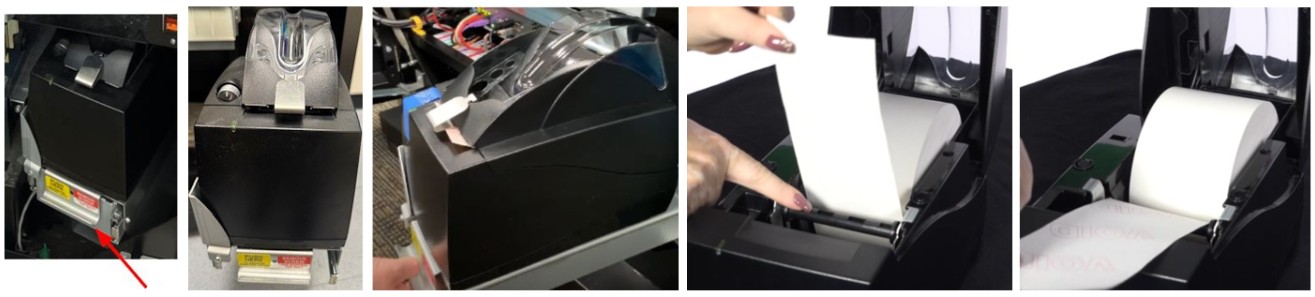
Printer Type A
-
Open the Main Door.
-
Slide the printer shelf forward.
-
Open the printer by pushing down on the silver button on the front of the printer.
-
Remove the paper roll.
- Insert a new paper roll.
-
- NOTE: Paper feeds from the bottom of the paper roll when it is inserted into the printer.
-
Center the paper and pull the end past the top of the printer door.
-
While still grasping the paper, close the printer door.
-
The paper will advance and cut automatically.
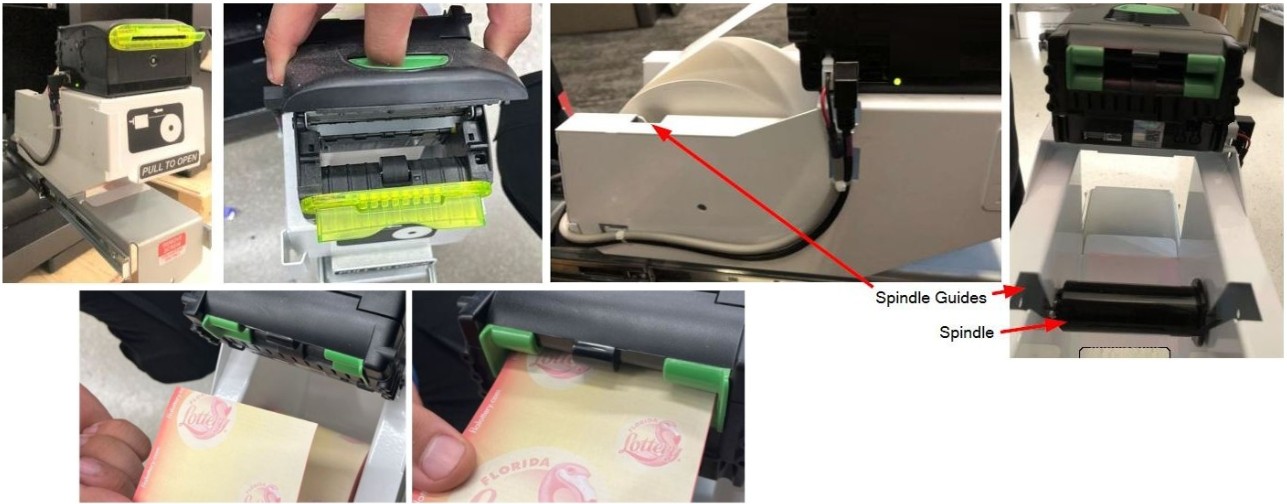
Printer Type B
-
Open the Main Door of the GameTouch 20/28 with the key labeled MD and locate the printer.
-
Slide the printer shelf forward.
-
Open the printer by sliding the green button back and lifting the printer cover.
-
Pull any remaining paper through the rear of the printer, then close the printer cover.
-
Remove the paper roll from the printer bucket. Ensure the spindle in the middle of the paper roll does not fall out.
-
Insert the spindle into the middle of a new paper roll.
-
Use the spindle guides to place the new paper roll and spindle into the printer.
-
Feed the paper into the rear of the printer so the paper is feeding from the TOP of the roll. The printer will auto-feed and cut the paper automatically.
-
Gently push the printer drawer back into the GameTouch 20/28.