
Playslip Reader Troubleshooting
Click Here for a tutorial on Cleaning the Reader (28 seconds).
Error Message / Intermittent Read / Incorrect Read
-
Verify the playslip is filled out correctlyand is correctly inserted into the reader.
-
If needed, advise the customer to fill out a new playsliporopen a new pack of playslips.
-
If the playslip reader is still not responding correctly, refer to the steps below.
Constant Reject/Jammed/No Response/Runs Constantly/Playslips Not Ejecting
-
Open the main door.
-
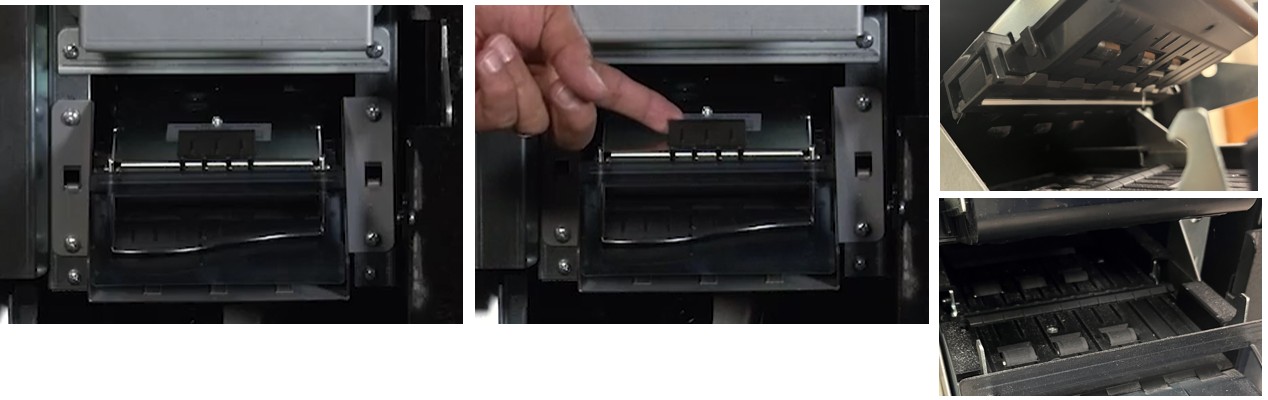
Gently pull up on the white latch on the top of the reader and open the reader door.
-
Remove any jams or debris.
-
Wipe the reader lens using isopropyl alcohol.
-
Never use a dry cloth.
-
-
Clean the rollers with a soft, clean cloth (paper towel will be fine).
-
Close the readerby lowering the dooruntil it clicks into place.
-
Close and lock the main door.
-
Test the the playslip reader with a blank playslip.
Contact Brightstar for help or additional troubleshooting:
- Select the chat icon in the bottom right corner of this screen and type in Hello to get started.
OR
- Call the Hotline at 1-800-729-4832.