
Self Service Vending Machine
Communication Troubleshooting
If the Vending Machine appears to have a Communication issue check the GT1200/GT1200c terminal for a Communication error.
-
If the GT1200/GT1200c terminal has a communication error (Comm Line Down, Comm Retrying, or Comm Online - Back Up):
-
Click Here to troubleshoot communication issues for the GT1200/GT1200c terminal.
-
-
If the GT1200/GT1200c terminal is Online (Comm - Online):
-
Secure the ethernet connections to the Hughes IDU, Netgear Ethernet Hub, and Vending Machine.
-
Verify the Netgear Ethernet Hub has power. There is a small power LED to the left of the ethernet ports.
-
If there is no power to the Netgear:
-
Ensure the power cord is firmly plugged into the Netgear and electrical outlet.
-
-
-
Power reset the Vending Machine using the power switch:
-
The power switch in the Gemini Ultra (LVM) and GameTouch 28 (GT28) is located above the managers display/touchscreen.
-
The power switch in the GameTouch 20 (GT20) is located below the barcode scanner.
-
-
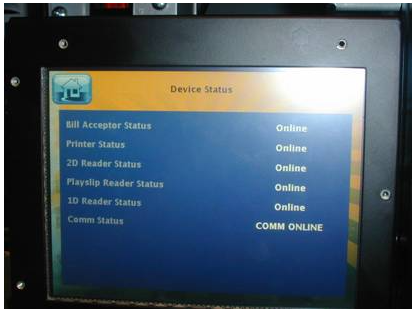
Check the Communication status on the Device Status Report.
-
- On the GameTouch 20/28 (GT20/28):
-
-
-
-
On the Reports Menu, select Device Status and the screen will display the Device Status Report.
-
Use the up and down arrows to scroll through text. Ensure all devices are Online.
-
If any devices are Offline, troubleshoot the device accordingly.
-
- Select PRINT to print the report or select HOME to return to the Home screen.
-
-
-
-
-
-
On the Gemini Ultra:
-
-
-
-
-
-
-
-
-
On the Main Menu, select Tools and Functions.
-
Select Device Status and the screen will display the Device Status Report.
-
Ensure all devices are Online.
- If any devices are Offline, troubleshoot the device accordingly.
-
-
-
-
-
Contact Brightstar for help or additional troubleshooting:
- Select the chat icon in the bottom right corner of this screen and type in Hello to get started.
OR
- Call the Hotline at 1-800-729-4832.