
Ericsson Communications Troubleshooting
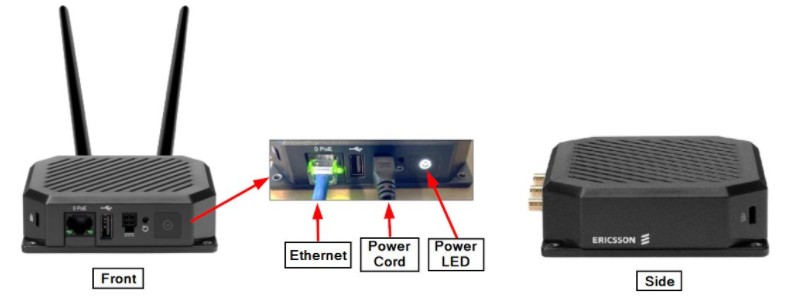
- Ensure the Ericsson Router has power by verifying there is white LED on the front.
If the Ericsson Router “IS NOT” getting power:
-
-
-
-
Ensure the Ericsson Routers power supply is securely plugged into the modem and electrical outlet.
-
Verify power to the electrical outlet using a small appliance, radio, etc. If there is still no power:
-
Try a different outlet.
- Check the Circuit Breaker.
-
-
-
-
-
Verify the power and ethernet connections to the Ericsson Router, and the GT1200/GT1200c terminal are secure.
-
Click Here to view a video on Verifying and Reseating the LAN Connection (1 minute 24 seconds).
-
-
Turn off the GT1200/GT1200c terminal using the toggle switch on the back or by unplugging the power cord from the electrical outlet.
- Unplug the Ericsson Router power cord from the outlet. Wait at least 10 seconds and then plug it back in.
-
- The power LED will blink yellow while resetting, blink white while it connects to the Cloud, and then stay solid white when the reset is complete.
-
Power on the terminal.
Ericsson Router (S400)
Contact Brightstar for help or additional troubleshooting:
- Select the chat icon in the bottom right corner of this screen and type in Hello to get started.
OR
- Call the Hotline at 1-800-729-4832.