
Reader Troubleshooting
- Used to read the play slips/tickets for validations.
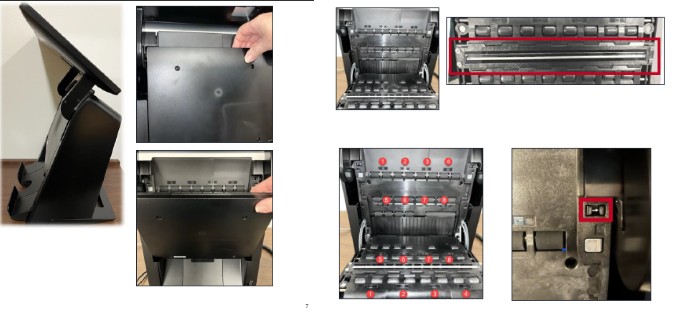
A play slip/ticket is placed vertically or horizontal into the terminal with the panels facing the clerk.
To Access Reader:
- Lift the LCD assembly to access the reader.
- Pull the door toward you.The inside of the reader contains motorized rollers and a long glass covered white line that reads the playslips/tickets.
Error Message / Incorrect Read / Playslips or Tickets not Ejecting
1. Verify playslip is filled out correctly and retailer is correctly inserting it into reader.
2. If need be: ask customer to fill out another playslip.
3. Open a new pack of playslips, if needed.
4. Open reader door, by lifting the LCD assembly and pull the door towards you.
5. Clean Glass lens (use alcohol or non-ammonia based glass cleaner. Do not use dry cloth).
6. Wipe rollers w/ dry cloth (paper towels are fine).
7. Close reader door.
8. Reset terminal (switch on the front or unplug powercaord from the wall). When power resetting, please know that the button must be pressed for 10-15 seconds for the terminal to shut down.
Error - Transport Faulted
- Open and Close Reader Door
Jammed
1. Open reader door, by lifting the LCD assembly and pull the door towards you.
2. Remove jammed media and inspect for any dirt/debris.
3. Close reader door and try slip again.
Playslip Wagering/Ticket Validation
- Insert the completed online game playslip or printed draw game ticket into the Reader vertically or horizontally, with the marked side facing towards you.
- A confirmation screen will appear for wagers of $11 and above. Touch YES to continue with the wager and NO if the customer does not agree to the amount shown.
- Tickets print automatically or message indicator for winning draw ticket.