
Scratchers Inquiry
To confirm a scratchers ticket value prior to validating:
- Select the Scratchers Menu.

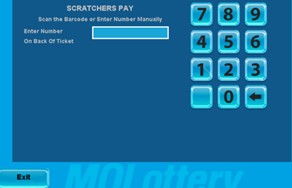
- Select Scratchers Pay.
- Scan the barcode on the back of the ticket.
OR
Manually enter the serial number located next to barcode and the 3-digit security number (VIRN) using the numeric touchpad.
Scratchers Validation
To validate a scratchers ticket:
- Select the Scratchers Menu.
- Select Scratchers Pay.

- Scan the barcode on the back of the ticket.
OR
Manually enter the serial number located next to barcode and the 3-digit security number (VIRN) using the numeric touchpad.
- Select Send to validate the ticket.
Validation Error Messages
ALREADY CASHED BY ANOTHER TERMINAL
- This message displays when a validation attempt is made on a ticket that was previously paid by another terminal.
NOT A WINNER
- This messages displays when a validation attempt is made on a non-winning ticket.
TICKET EXPIRED
- This messaged displays when a validation attempt is made on a ticket that is expired.